Snack Pouch Packaging Mockup: A Practical Tool for Brand Presentation
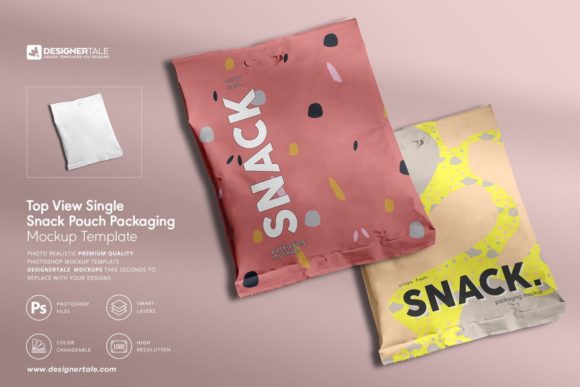
A Snack Pouch Packaging Mockup is a high-fidelity digital template designed to visualize how branded snack packaging will appear in real-world contexts—without printing physical samples. Unlike generic 3D renders or basic flat layouts, this specific mockup delivers a photorealistic top-view representation of a single stand-up pouch, optimized for clarity, speed, and professional output. It’s not just a visual placeholder; it’s a working asset built for designers, marketers, and product developers who need to evaluate design iterations quickly and communicate ideas effectively across teams or with clients.
What Sets This Snack Pouch Packaging Mockup Apart
This particular Snack Pouch Packaging Mockup stands out due to its deliberate focus on usability and realism. Its top-down orientation provides an unobstructed view of the entire front panel—ideal for showcasing logos, typography, color schemes, and surface patterns without distortion or perspective interference. The artboard resolution (6000 × 4000 pixels) and editable product area (3452 × 3676 pixels) ensure crisp detail even in large-format presentations or print-ready deliverables. At 300dpi, it meets commercial production standards, eliminating guesswork when transitioning from concept to shelf.
Smart objects are color-coded and logically grouped—labels, background layers, shadows, and reflections are separated and labeled intuitively. That means swapping a logo or adjusting a background gradient takes seconds, not minutes. There’s no need to navigate nested layer masks or reconstruct lighting effects manually. And because only one PSD file is included, version control and file management remain straightforward—no fragmented assets to track across folders.
How It Compares to Other Packaging Visualization Options
Designers often choose between three main approaches when presenting snack packaging: flat templates, 3D modeling software, and photorealistic mockups like this Snack Pouch Packaging Mockup. Each has tradeoffs:
- Flat templates are lightweight and fast but lack depth, texture, and environmental context—making them less effective for client approvals or pitch decks where realism matters.
- 3D modeling tools (e.g., Blender, Cinema 4D) offer maximum flexibility but require significant time investment, technical skill, and rendering resources. They’re overkill for early-stage branding tests or rapid iteration cycles.
- Photorealistic mockups, especially those built with smart objects and layered lighting, strike a middle ground: they deliver convincing realism while remaining fully editable and accessible to non-3D specialists.
This Snack Pouch Packaging Mockup leans into that sweet spot. Compared to earlier versions—like the plastic snack pouch mockup—it refines the viewing angle and enhances surface fidelity. The top view eliminates assumptions about pouch height or fold behavior, letting designers focus solely on front-panel communication. It doesn’t simulate material stretch or crinkle, nor does it show side gussets—but that’s intentional. It prioritizes clarity over simulation, which suits most branding workflows where the primary goal is evaluating visual hierarchy, contrast, and pattern legibility.
Strengths and Real-World Use Cases
The core strength of this Snack Pouch Packaging Mockup lies in efficiency and consistency. For example:
- A food startup testing five flavor variants can apply each label design to the same mockup—ensuring identical lighting, shadow placement, and scale—so differences in perception stem from design, not presentation artifacts.
- An agency preparing a brand refresh for a seasoned snack line can use the mockup to preview how updated typography interacts with existing color blocks before committing to print plates.
- Freelance designers pitching to CPG clients benefit from delivering polished, presentation-ready visuals without needing access to studio photography or retouching services.
Its organized layers also support collaborative feedback. A marketing manager can request a change to the background color, while a designer updates only the designated smart object layer—no risk of altering drop shadows or misaligning highlights. That predictability reduces revision rounds and speeds up approval timelines.
Limitations and When to Look Elsewhere
While versatile, this Snack Pouch Packaging Mockup isn’t suited for every scenario. Its top-view framing means it cannot demonstrate how the pouch looks when held, stacked, or placed on a retail shelf at eye level. If your goal is to assess shelf impact, consumer reach, or comparative visibility against competitors’ packaging, you’ll need complementary assets—such as angled or in-context mockups, or even physical prototypes.
It also doesn’t include pattern files. The presentation images may show textured backgrounds or repeat motifs, but those are for illustration only. You’ll supply your own patterns or graphics, which is standard practice—but worth noting if you expected ready-to-use decorative elements. Similarly, while color is fully editable, the base material tone (e.g., matte vs. glossy finish, foil accent placement) is baked into the lighting and reflection layers. You can adjust hue and saturation, but simulating a metallic sheen or kraft paper grain would require additional Photoshop work beyond the smart object structure.
If your project involves complex structural variations—re-sealable zippers, tear-notches, or multi-layer laminates—this mockup won’t reflect those details. It assumes a standard laminated stand-up pouch with a clean front panel. For structural engineering or regulatory labeling validation, physical samples or CAD-based prototyping remain necessary.
Making the Right Choice for Your Workflow
Choosing whether this Snack Pouch Packaging Mockup fits your needs depends less on “what it is” and more on “what you’re trying to accomplish.” Ask yourself:
- Is the priority speed and consistency? If you’re cycling through multiple label designs or preparing seasonal variants, the smart object setup saves hours per iteration.
- Is realism needed for stakeholder buy-in? Photorealism builds confidence faster than flat layouts—especially with non-design stakeholders who rely on visual cues to assess brand alignment.
- Do you have access to editing tools and moderate Photoshop proficiency? This mockup assumes familiarity with smart objects and layer visibility toggles—not advanced compositing, but enough comfort to replace content without breaking the structure.
- Are you evaluating front-panel communication above all else? Then the top view is an advantage, not a limitation. It removes distractions so typography, iconography, and color relationships stay center stage.
Conversely, if your workflow relies heavily on dynamic lighting adjustments, multi-angle previews, or integration with automated design systems (e.g., batch-processing hundreds of SKUs), you might explore plugin-based mockup generators or custom-built templates with scripting support. But for most small-to-midsize branding projects—especially those led by solo designers or lean creative teams—this Snack Pouch Packaging Mockup offers a balanced combination of fidelity, flexibility, and practicality.
Final Considerations Before Use
Before downloading or integrating this Snack Pouch Packaging Mockup into your process, verify your software compatibility (Adobe Photoshop CC 2019 or later recommended) and confirm that your team understands how to preserve smart object integrity during edits. Avoid flattening layers unless absolutely necessary—doing so forfeits the time-saving benefits of the color-coded structure.
Also consider pairing it with complementary assets: a front-and-side view mockup for dimensional context, or a lifestyle scene mockup for social media previews. No single mockup covers every use case—but used intentionally, this one fills a distinct and valuable niche in the packaging design toolkit.