Leaves Watercolor Clipart
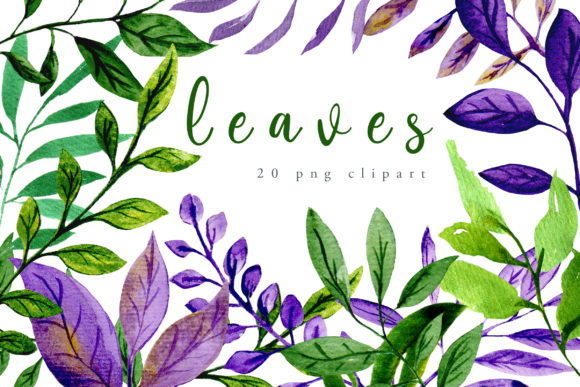
There’s something quietly powerful about a hand-painted leaf—its subtle texture, organic imperfection, and gentle gradation of pigment. That authenticity is exactly what makes Leaves Watercolor Clipart stand out in a world saturated with vector-perfect, overly uniform graphics. This isn’t just another clipart pack. It’s a thoughtfully curated collection of 20 high-resolution, hand-painted watercolor leaves—each scanned at 310 dpi and sized to 1100 pixels on the longest side—with crisp transparent backgrounds ready for immediate use.
What sets this set apart isn’t just its visual warmth—it’s how intentionally it bridges craft and utility. Every leaf was painted by hand using real watercolors, then digitally preserved without flattening the natural paper grain or soft edge bleed. The result? A balance of artistic integrity and practical versatility: green and purple tones that harmonize effortlessly, shapes that range from delicate fern fronds to bold monstera silhouettes, and transparency that drops cleanly into any design environment—no tedious masking required.
Why Designers Reach for These Leaves First
Professionals don’t choose assets based on aesthetics alone—they prioritize reliability, adaptability, and time saved. With Leaves Watercolor Clipart, you get all three.
- No layering guesswork: Each PNG loads with true alpha transparency—ideal for overlaying on textured backgrounds, gradient overlays, or foil-printed stationery without jagged edges or halo artifacts.
- Color flexibility built-in: The green and purple palette leans botanical but avoids oversaturation—making it easy to recolor subtly (via blending modes or hue/saturation adjustments) without losing watercolor nuance.
- Scalable without compromise: At 1100 px and 310 dpi, these hold up beautifully on print projects like wedding invitations or fabric swatches—and scale down cleanly for web buttons or social media banners.
Unlike generative AI watercolor textures—which often lack tactile variation or repeat unnaturally—these leaves retain individual character. One may have a faint salt bloom; another, a whisper of lifted pigment where the brush lifted. That subtlety reads as human-made, not algorithmic. And in branding or invitation design, that distinction builds trust and emotional resonance.
Real-World Uses You’ll Reach For Again and Again
This collection shines where intentionality matters most—not just where decoration is needed.
Wedding and event design is an obvious fit, but it’s how you use them that counts. Try scattering three small leaves along the spine of a folded invitation suite, or layering a single large monstera behind handwritten names for a modern botanical feel. Because each image is isolated and transparent, they integrate seamlessly with calligraphy, foil stamping, or letterpress textures—no competing outlines or hard shadows.
In scrapbooking and paper crafts, these leaves behave like physical ephemera. Print one on vellum, cut it out, and layer it over a photo for depth. Or use them as digital “stamps” in Procreate or Affinity Designer—adjust opacity, blend mode, or add light grain to mimic real collage.
For product packaging and textiles, the organic flow translates well to repeating patterns. Rotate and stagger a few leaves across a tile grid, adjust spacing to avoid rigidity, and export as a seamless pattern swatch. Many designers use just 4–5 of the 20 leaves to build cohesive fabric prints for napkins, tote bags, or gift wrap—without needing custom illustration.
Digital creators also find unexpected value here. Bloggers use a single leaf as a subtle divider between newsletter sections. Educators embed them into printable worksheets for botany units—adding visual interest without distracting from content. Even SaaS teams drop one into a dashboard header to soften a data-heavy interface.
What to Consider Before You Download
While Leaves Watercolor Clipart is highly adaptable, smart usage starts with realistic expectations.
First: this is a clipart collection—not a font, not a template, and not editable vector artwork. You won’t be adjusting anchor points or reshaping stems. But that’s by design. Its strength lies in its fixed, painterly authenticity—not geometric flexibility.
Second: the color range is intentionally restrained. There are no neon greens or electric purples. If your brand relies on high-contrast, saturated palettes, you’ll likely need to adjust saturation or add complementary elements—but that’s often easier than toning down oversaturated stock art.
Third: while all files are PNGs with transparency, double-check your software’s handling of alpha channels. Some older versions of PowerPoint or basic online editors may render faint gray halos. Opening in Photoshop, Affinity Photo, or even free tools like Photopea first ensures clean placement.
A Note on Licensing and Commercial Use
This collection is licensed for both personal and commercial use—including client work, printed products, and digital goods—so long as you’re not reselling the files themselves as standalone clipart. That means you can confidently use them on wedding invites you design for clients, on stickers you sell in your Etsy shop, or as part of a Canva template you license to other designers. No attribution is required, but crediting the original artist (if known) remains a respectful industry practice.
It’s also worth noting: because these are high-resolution raster files—not vectors—they’re best suited for applications where resolution is controllable. Avoid stretching them beyond 150% in print layouts unless you’re confident in your RIP or printer’s interpolation settings. For large-format wall murals or signage, consider commissioning vector redraws of select favorites instead of pushing the PNGs too far.
Ultimately, Leaves Watercolor Clipart works because it respects both the craft and the workflow. It doesn’t ask you to bend your process around it. Instead, it slots in—quietly, gracefully—wherever you need organic warmth: on a linen wedding envelope, behind a blog headline, stitched onto a cotton tea towel, or floating softly across a landing page hero section. It’s not flashy. It doesn’t need to be. Sometimes the most effective design elements are the ones that feel inevitable—like a leaf that was always meant to be there.